The first person I ever managed was someone I never met or saw. I have continue to manage people remotely since. Here are some learning. https://medium.com/adaptovate/what-i-have-learnt-managing-people-remotely-1e69de49805c

 Its Just Good Management
The first person I ever managed was someone I never met or saw. I have continue to manage people remotely since. Here are some learning. https://medium.com/adaptovate/what-i-have-learnt-managing-people-remotely-1e69de49805c

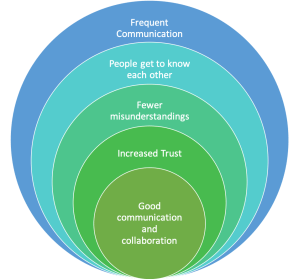
One of the biggest challenges we face when working physically apart from each other is communication. Use of tools, routines and agreements are only successful if you communicate effectively and frequently.
Effective communication is 20% what you know and 80% how you feel about what you know
Jim Rohn
So what is successful frequent communication? There is no one answer. Everyone is different, which means what one person feels is frequent, maybe overbearing or underwhelming for someone else. You need to learn what feels right for you, and the people with whom you work.
Communicate most frequently through chat applications like Slack, Workplace or Yammer. Think of quick messaging as replacing the continual flow of information that your in-person presence provided. Consider sharing how your day is going, challenges you are facing, and what is amusing you. Using a tool like Slack or Workplace, you can share with your colleagues informally to build and maintain rapport.
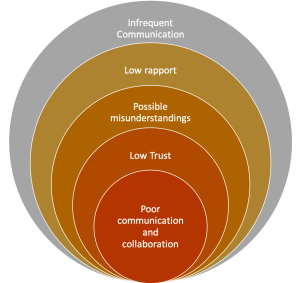
Be clear what you want to achieve with your communication, failure to set intent leaves a message without context. At best, the other party is confused, at worst they are offended. Rather than building trust and rapport, the outcome may be that you create an emotional distance.
Wise men speak because they have something to say; Fools because they have to say something.
Plato*
Your purpose may be social
Your purpose may be business
* Plato - https://www.tameday.com/team-communication-quotes/
** Jim Rohn - https://www.facebook.com/OfficialJimRohn/posts/effective-communication-is-20-what-you-know-and-80-how-you-feel-about-what-you-k/10155654356195635/

Agreements between team members on desired behaviours, supporting actions and communication has three clear benefits:
“Team norms” are a set of guidelines created by the team, for the team, that inform how best to interact with each other. Other popular formats include “team working-agreements”, “team contracts” and team member “user guides”. While the formats are different, they all created by the team members to define the desired behaviours and outcomes.
When establishing a team, the individuals involved go through a well-documented pattern of Forming, Storming, Norming and Performing as explained by Tuckman*. The process of working with a team to develop a set of agreed behaviours, helps the group fast track through the Norming and Storming states, to begin Performing sooner.
Performing is where you want to be
The Forming process involves team members understanding the challenge ahead and politely orientating to the tasks at hand. The Storming phase involves individuals sharing their ideas with people typically beginning to experience each other’s working styles. Agreeing on acceptable behviour within the team helps address early, the conflict which can arise when individual styles clash. The earlier you deal with this the better.
Through collectively discussing working styles in the “safe” setting of a workshop, disagreements can be resolved in a calm and blame free manner, versus the chaos which can erupt when surfaced while trying to get work done. By consciously dealing with norming behaviours, the team matures more rapidly by establishing the patterns of positive interaction required for high performance.
With an agreement in place, there is less pressure when addressing undesired behaviour. Where all team members participate in the development of their behavioural norms, they are more comfortable using them to self-regulate the team. For example a team member’s behaviour of checking their phone disrupting daily standups, may be called out as being against the joint agreement. Revisiting and adjusting these rules of engagement to cater to new or altered circumstances enhances trust between team members as they observe action to look after each other.
By crafting the type of environment in which they want to work in, individuals are more likely to want to stay with their team. A reduction in behaviours which are deemed unwanted, removes friction to getting work done, eases interaction within the team and provides for the opporuntity for fun – resulting in a happier place to work.
*https://en.wikipedia.org/wiki/Tuckman%27s_stages_of_group_development

There is a myriad of tools that can help people collaborate across location and across timezones. Below are my top 3 things to remember when selecting and using them.
If your processes or procedures are flawed, moving them to a tool will probably allow you to do bad work faster and at a larger scale.
Explore a range of scenarios with your team and agree on which tool you might use in each one. Every month new software is launched, there are many opportunities to get a good fit.
Encourage positive practices as behavioural norms within the team. Remind people that communication helps us get clarity, builds trust and can be fun.
As you work remotely and use tools to communicate, collaborate and visualise your work remember to reflect. Take the time to ask what is and what is not working routinely. Adjust when you need to.

A team that aligns frequently, delivers good quality work at a predictable pace. By having a focus on high value output they work on the right things. Conversely, a team which does not align frequently can fragment rapidly, be inconsistent in their delivery and expend energy on low-value activity.
People are motivated by doing things that matter. One way to ensure that team members understand their efforts matter, is through regularly engagement. Engagement can be made meaningful by explaining the what the desired outcome is, that they are being asked to contribute along with the reason why that outcome is valuable.
In a constantly changing world, there is a need to update teams with changes in priority and include them in the early thinking behind changes. This will enable them evolve their thinking and adapt as required.
Frequent alignment sessions build inclusion, alignment and consistency
A team with a mission is a team with a purpose. Team members know where they are going and what they are likely to encounter along the way. As teams form, they do so as a group dedicated to fulfilment their purpose. They will hone their skills and apply their energy to achieve success.
Alignment is necessary to reconnect team members with the mission and purpose as context changes to ensure they know which direction to head. As we build teams of competent people and provide them with purpose and prioritisation, they are able to put their skills to work to develop the solutions using their expertise.
Alignment allows synchronisation and collaboration. Together, this is a basis for shared work experiences which in turn help create an environment to establish trust. This trust forms a virtuous feedback loop to collaboration which is improved, to further build that trust.
Synchronisation – By knowing when and how the team is going to meet, an individual can match their own cadence to the group’s rhythm. Without frequent and regular alignment, each time they meet, it will feel ad hoc and require an expenditure of energy to figure out how to conduct their catch up.
Collaboration – By talking at frequent intervals, people can balance their own contribution with the opportunity to share and ask for help. Breaking work up into small items enables an understanding who is working on what and when provides the opportunity for an individual to be somewhat autonomous.
Knowing the context of the work being done and having regular interactions with the rest of the team creates enables an individual to contribute their best. When provided with the right information to enable success, a motivated person who is part of a team with the required competencies, is able to deliver quality output.
Alignment and autonomy allow people to exert their skills and do their job often with a lift in satisfaction and quality.

In a face to face world, we often know where to find each other. We know that to find the team we need, we can take the elevator and walk down the appropriate corridor. Walls often display the team’s work progress, and there is usually someone around to ask a question.
In a world where people are working flexibly across different hours and locations this doesn’t work – we need other solutions.
You want people to alert you to the things you need to know!
When working as part of an organisation, there are going to be times your team is impacted by the work others do. You want to be aware of such changes before they happen. If who are are, and what you do is hiding in some corner of the intranet, it will be hard for people to identify you and your needs. Critical changes may take place with results varying from less that optimal solutions to devastating consequential effect.
With a little bit of effort, your team can begin to advertise their existence. Your team is probably part of a larger group which already has a presence on SharePoint or similar, talking vaguely about what they do.
You want to ensure that your team’s presence is loud and proud; you want others to reach out and include you when needed.
Tap into one our your team member’s creative superpower to establish a positive online presence. Showing a little inspiration will provide others with the confidence that you know what you are doing, and it is worth engaging with you.
Now you have someone’s attention, make the most of it. Tell them what your team does and does not do. People can then begin to frame their engagement with your team or keep looking for the right contact. Both of these will save you time. More of the right questions and less of the time-wasting ones.
It is not enough to only talk about the work you do. Organisations are groups of people and these connections make the work possible. So, tell them about yourselves.
Sharing who is in your team and what they can do, will help your team create useful networks, by assisting like-minded people both today and tomorrow.
It never hurts to share success. By adding some success stories you:
Each of these things is important for when you need to reach out to others for help. Your online presence demonstrates you value others time and will enhance communication with stakeholders, build coalitions of like minded people and other teams moving forward.

Agile emphasises the importance of co-located cross-functional teams. Cross-functionality is important as we want teams to be as independent as possible which often requires the utilisation of the full experience and knowledge of the group. Co-location helps unlock the cross-functional expertise across the team to increase speed and improve the quality of work. As an Agile coach, I typically advise against breaking a team into groups which become sub-teams, creating mini-silos. The reason for this is that all the delays, misunderstandings and lost opportunities that come from work spread across different teams become replicated within the team on a smaller scale.
When team members are not co-located or working the same hours we have to acknowledge there are trade-offs. In this case, the frustration of not being able to contribute value outweighs the downside of working independently within the team. Breaking the work up, to specifically enable task assignment to individuals or groups based location and working hours, empowers people to work with a degree of independence resulting in getting more done.
This person may work different hours for flexibility, be in the same city or a different country but not frequently in the same office. This kind of worker can effectively contribute through:
Sometimes teams are located by skill set. Allocation of work where most, but not all the skills exist at a location, often provides the opportunity for team members to develop more T shaped skills, the broader knowledge (the broad top of the T) to complement their speciality knowledge (the narrow vertical part of the T). Peer review of work by swapping between locations can help teams stay aligned but be realistic of the physical separation.
A typical scenario is for Product Owners to sit with the team stakeholders, rather than the team. The Product Owner is an integral part of the overall team and is accountable for their own work to propel the team forward. This output takes the form of a prioritised backlog of Epics, Features and User Stories. The highest priority work should be refined with clear descriptions of who the work is for, what the need is and why that is important. Additional to this, there should be a description explaining the elements which would make it complete:

The reality of modern business is that many of our teams are spread across locations and time zones. In some cases, this is because of where we we live and work, other times it is due to flexible work arrangements which help us balance our lives. This series covers the trade-offs we make to build active, efficient and engaged teams across the divide of location and time.
I have consulted to and worked with people who are unclear who is in their team, when they work and how to get in touch with them. Sometimes this may be a result of management not confirming organisational structure, however often it is due to remote or flexible working – people may be names on a page and nothing more.

There is confusion, low output and everyone is unhappy. Being unable to answer the question, “have we got everyone” results in unrest. People hold back from committing to the team if they feel the team is incomplete or unprepared. They can be stuck in a perpetual team “Forming” stage, not willing or able to risk the conflict required to progress to “Storming” without understanding the future structure of the team. Trust is delayed.. This results in:
There are simple things that can be done to increase the sense that the team is complete. This includes people who work remotely or different hours.
Communication is hard. People hesitate, procrastinate and even avoid reaching out if they don’t expect their contact to be welcomed. Effective practices to build a shared understanding across the team of when each member is likely to be available removes one of the hurdles.

The reality of modern business is that many of our teams spread across locations and time zones. In some cases, this is because we live and work in different offices; however, it can also be because due to flexible work arrangements which help us balance our lives. This series covers the trade-offs we make to build active, efficient and engaged teams across the divide of location and time.
It is easy to think of team members who you don’t see every day as being different from the rest of the team. Just like a superhero, this difference can result in them not feeling part of the team. The resulting impact is that our superhero becomes isolated, resentment in both directions builds, joint commitment to goals diminishes, reducing output while demotivation spreads through the team. These issues can occur when people work physically together; however, it occurs more rapidly when people are not working side by side.
People work in a across offices and time zones for many reasons. Often the reasons reveal ways they can bring something different to the team. Think of each team member as a gateway to knowledge and stakeholder networks.
For example, someone might be working in another building or country based on previous membership in another group due to their experience in a centralised operational role – leverage their knowledge to understanding the problems and at a deeper level and strive for more practical and creative solutions. Use their unique contacts to test designs and prototypes with in a way not usually accessible.
Sometimes a team member is selected as they worked in a team organisationally or physically close to a key stakeholder. Building a liaison-type role for them within the team can accelerate the speed and improve the quality of feedback. This role provides an advantage to both the team and stakeholder while acknowledging the power that the relationship that the individual has been able to add to the team.
Technology enables many of us to achieve a better life balance by working where and when we are most able to. Sometimes this flexibility puts people in situations which are unique in the team. Ways in which these circumstances can allow the team to get more done include:
Unlocking the potential of people to leverage their different circumstances to create a team with broader reach. Distributed team members can be in places the rest of the team are not; they can be available at alternate times of days. The result is a team greater than the sum of their parts.

The reality of modern business is that many of our teams are not co-located. In some cases this is because we live and work in different locations; however, it can also be due to flexible work arrangements that help us balance our lives. This series covers the trade-offs we make to build active, efficient and engaged teams across the divide of location and time.
Few things build a team like sharing an experience. Unfortunately, it can be hard to get everyone together at the same time – let alone the same space. Whilst it might sound obvious to record events, it is something which is still rarely done.
The Showcase aims to get everyone together at the same time, even via video. Keeping the immediacy of the event drives attendance. However, where team members, or key stakeholder, cannot be present for structural reasons (time zones, leave, immovable schedule clashes) recording has high value.
Some large-scale (e.g. cross team or quarterly) planning sessions may have outcomes where a stakeholder is scheduled to share their views on a topic impacting the team, such as overall goals or business value. Recording and sharing these insights and other relevant introduction and wrap up statements has high alignment value.
Hearing stories about issues that impact the whole team together, contribute to collective identity and build alignment. Seeing facial expressions, body language and hearing a presenter’s voice, conveys more information than an email or intranet update. In some cases, being witness to storytelling leads to new meta-stories: stories about how passionate, excited, or perhaps disappointed someone was. Recording these sessions when everyone cannot attend, provides the ability for someone working part-time, or remotely to catch up on both what was said, and how – to connect with the work and the culture.
Outcomes of regular, short discussions and ceremonies can effectively be communicated by updating a web page, distributing minutes or making a phone call. Any absent team members will be seeking summary information like an overview or a list of outcomes. Watching a real-time dialogue would have little value to them.
Even a smartphone can be a great tool to capture and edit a session. If you miss out on the live recording, perhaps record a brief message recapping the highlights for those who were not present.
Often the decision to use video to stream, or record a session, is made with little inclusion or agreement with presenters. This provides little opportunity for them to consider how to adjust their behaviour to cater to the video. Engage with the presenters early to let them know your plans and discuss how best to capture them on video as they present in the room. Talk about where the microphones are and where to stand – a taped “X” on the floor is a great way to help presenters be in the frame, roaming microphones help capture the different voice levels.
It is essential that the sound quality is good enough to understand who is talking and what they are saying. Test the audio before the session. A clear recording can bring a team together, a poor quality recording is a source of frustration and can lead to remote team members feeling even more left out.
To watch a presentation in real-time, takes real time!
With video, less is more, if a video is going to be seen by multiple people or viewed repeatedly, take the time to do at least some basic editing. Simple edits like starting and stopping the video, capturing only the interesting parts, lets viewers access the message and experience quickly. The longer a session, the more critical editing is.
If it is not being watched find out why. It could be an indication of poor content or deeper engagement or workload issues within the team. Either way, you will gain useful information for action.
Team members who are not included in live communications, or don’t get to experience stakeholder feedback, will not be up to date. Excluding these people, even passively, sends a message that everyone else is OK with them not knowing what is going on in the team or how their work is being accepted.
Any information passed on “second hand” is done so with an interpretive layer. The listener loses the ability to put their own interpretation on the original messaging. By contrast, gathering people to hear the same thing at the same time has power in aligning people with a singular message, a consistent voice.
Have some fun, large groups are likely to have a budding director or someone who loves to share their technical prowess. Accept that the first few attempts recording will be clunky and welcome the inevitable issues as learning opportunities. Sharing the reasons why you are recording, that you want to include everyone in what is going on will be appreciated.

 Its Just Good Management